Section 2: CNC operations
CNC Hardware
Our CNC router works through a process of cutting called milling. According to Wikipedia:
Quote
“Milling is the machining process of using rotary cutters to remove material from a workpiece advancing (or feeding) in a direction at an angle with the axis of the tool. It covers a wide variety of operations and machines, on scales from small individual parts to large, heavy-duty gang milling operations. It is one of the most commonly used processes in industry and machine shops today for machining parts to precise sizes and shapes.”
Wikipedia
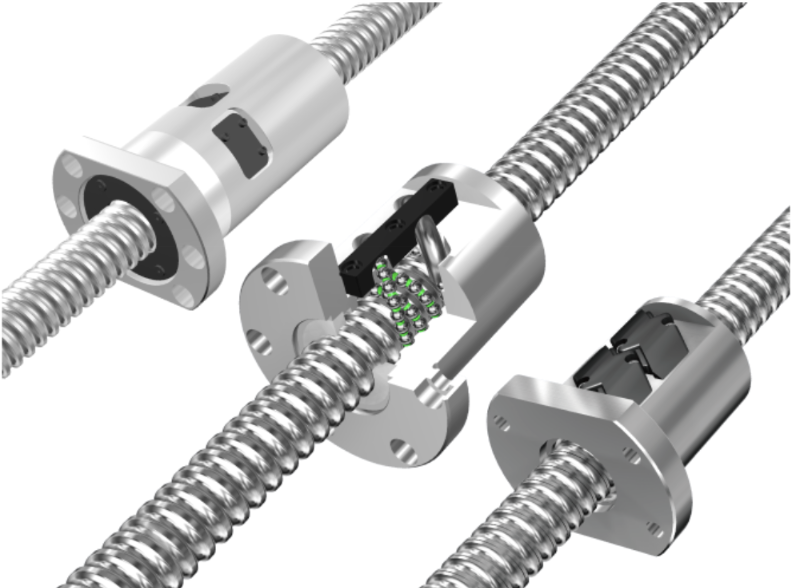
The spindle, the motor which spins the cutter, is moved through the precise control of 3 motors, one for every axis. Our routers use ball screws, which are incredibly rigid and precise, but other applications such as 3d printing might use timing belts for their superior speed.
The axis of the cnc uses Stepper motors, useful for applications where motor position is critical. On the other hand the spindle is a Variable Frequency Drive Motor, which controls voltage to regulate the rotational speed.
The OmioCNC has a controller box which connects a computer via USB. The computer which has Mach3Mill can then run the CNC from the application.
Every axis also has a limit switch. These are used to home the CNC to absolute zero but are also a safety measure to ensure the CNC does not try to machine outside its boundaries.
The OMIO CNC also has a water pump which connects to the spindle to provide cooling. This can be turned on by hitting the switch on the pump/reservoir.
Our CNC is also connected to the pneumatic lines in our shop. This connects to the air blast, which blows away freshly cut chips during operation.
Lastly the CNC is housed in an enclosure which reduces noise and contains the mess of chips.
Understanding CNC coordinates and offsets
CNC routers and mills use a cartesian coordinate system. In other words, it stores its position as X, Y, and Z. Typically the zero position, where X, Y, and Z is zero is at one of the corners of the CNC. This position is known as absolute zero, or machine zero. This is also the basis for machine coordinate. The second type of coordinate is the relative coordinate, also known as the offset.
When generating code, the position of our offset is indicated by the XYZ vector.

There are 5 reserved G-code commands for offsets, these are, g54, g55, g56, g57, g58, g59. Depending on your CNC controller, you may be able to save more than 5 offsets using 54.1, 54.2, 55.1, 55.2, etc.

Basic Control of the CNC
Sometimes we want to move the cnc outside of a program. We can do this through a process known as jogging, which is basically free control of the cnc.
First turn on the CNC. You can do this by flipping the switch on the CNC controller box (make sure the estop is not pressed. You can twist the e stop button clockwise to release it). Turn on the computer opening mach3mill (OMIO) or winCNC (ShopSabre)