Vision in FRC
What is Computer Vision?
Computer Vision is a technology that helps computers “see” and understand pictures and videos, just like how people use their eyes and brain to understand the world. It uses tools like math and computer programs to figure out what’s in an image, like recognizing faces, objects, or movement. Computer vision is used in many cool ways, like unlocking your phone with your face, helping cars drive themselves, spotting problems in factories, and even helping doctors find diseases in medical images. It’s all about teaching computers to make sense of what they see!
A Good Video introducing Computer Vision: Computer Vision Crash Course.
Why Use Vision in FRC?
In FIRST Robotics Competition (FRC), vision processing plays a critical role in helping robots interact with their environment by analyzing images and identifying important targets, objects, or game pieces. Vision systems can enhance robot accuracy, speed, and autonomy.
Vision systems are used to:
Identify field elements like scoring targets, reflective tape, or game pieces.
Align the robot accurately for tasks such as shooting or placing objects.
Track and follow moving objects.
Localize the position of the robot. Essentially using what the robot sees to make a guess at where it is on the field.
Most systems follow some general steps:
Image Capture: The camera captures an image of the field or target.
Preprocessing: The image is filtered, resized, or adjusted (e.g., color thresholding) to focus on the target.
Target Detection: The vision pipeline identifies key features such as contours, shapes, or colors.
Processing: Depending on the goal, the computer uses target detections to compute useful information, such as the distance to a target, the location of the robot, or the state of a game piece etc.
Feedback: The vision system sends information to the robot’s code (e.g., angles or distances) to make decisions and execute tasks.
Due to the high overhead of processing images, most FRC teams choose to run any vision algorithms on a co-processor like a Raspberry Pi, Jetson Nano, or a Orange Pi 5, and only send the relevant information to the Roborio over Network Tables.
Similarly due to the increasing complexity and necessity of fast, robust, and accurate vision, many FRC teams opt to use COTS solutions such as Photon Visiomn, or Limelight.
Camera Calibration
Camera calibration is the process of determining a camera’s intrinsic properties (like focal length and optical center) and distortion parameters. This allows the camera to accurately interpret real-world measurements from images. Calibration is crucial in applications like robotics, where precise measurements are needed to calculate distances, angles, and positions. Without proper calibration, even small distortions caused by the lens or perspective can lead to significant errors. In systems like FRC vision processing, calibration ensures the robot can correctly estimate the location and orientation of field elements, making tasks like alignment, targeting, and navigation reliable and accurate.
For more Information on Camera Calibration visit the Limelight Docs.
Stereo Vision
Stereo vision is a technique that uses two cameras to create a 3D representation of the environment. By capturing images from two slightly different viewpoints, stereo vision systems can calculate the depth and distance of objects in the scene. This depth information is valuable in robotics for tasks like obstacle avoidance, object tracking, and localization. In FRC, stereo vision can help robots navigate complex environments, interact with game elements, and make precise movements with depth perception.
A Simple explanation of Stereo Vision.
A detailed explanation of the Math.
We have in the past used the Luxonis OAK D camera for stereo vision, and it has worked well for us.
Read the OAK-D page for docs on how to use our current system.
Pose Estimation
Pose estimation is the process of determining an object’s position (x, y, z) and orientation (roll, pitch, yaw) in space. In robotics, this is essential for understanding the robot’s location and movement relative to its environment. To improve accuracy, different position measurements from sensors like encoders, gyroscopes, cameras, and LIDAR can be fused using techniques such as Kalman filters, which combine sensor data while accounting for uncertainties, or sensor fusion algorithms like complementary filters. By blending data from multiple sources, robots can reduce noise and handle sensor inaccuracies, resulting in more reliable and precise pose estimation, critical for tasks like autonomous navigation and alignment.
Kalman filters are mathematical algorithms used to estimate the state of a system, such as a robot’s position or velocity, by combining noisy measurements from multiple sensors. They work by predicting the system’s next state based on a model (e.g., motion equations) and then correcting that prediction using actual sensor data. The Kalman filter accounts for uncertainties in both the model and the measurements, finding the best estimate of the system’s state over time. In robotics, Kalman filters are widely used for tasks like pose estimation, navigation, and object tracking, as they enable robots to make accurate decisions even with imperfect sensor data.
To learn more about Kalman Filters check out this book and this github repository.
For an example on how to use a kalman filter to fuse vision and odomtery measurements to estimate our pose, check out our 2025 codebase.
Coordinate Systems
Coordinate systems are used in FRC programming in several places. A few of the common places are: robot movement, joystick input, pose estimation, AprilTags, and path planning.
It is important to understand the basics of the coordinate system used throughout WPILib and other common tools for programming an FRC robot, such as PathPlanner. Many teams intuitively think of a coordinate system that is different from what is used in WPILib, and this leads to problems that need to be tracked down throughout the season. It is worthwhile to take a few minutes to understand the coordinate system, and come back here as a reference when programming. It’s not very difficult to get robot movement with a joystick working without getting the coordinate system right, but it will be much more difficult to build on code using a different coordinate system to add pose estimation with AprilTags and path planning for autonomous.
WPI convention
In most cases, WPILib uses the NWU axes convention (North-West-Up as external reference in the world frame.) In the NWU axes convention, where the positive X axis points ahead, the positive Y axis points left, and the positive Z axis points up referenced from the floor. When viewed with each positive axis pointing toward you, counter-clockwise (CCW) is a positive value and clockwise (CW) is a negative value.
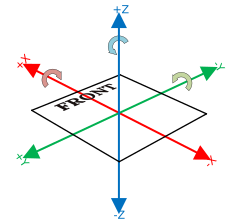
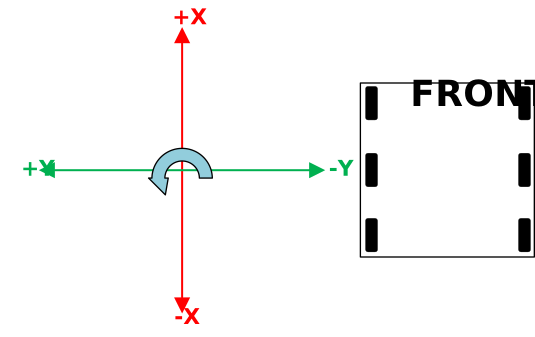
The figure above shows the coordinate system in relation to an FRC robot. The figure below shows this same coordinate system when viewed from the top (with the Z axis pointing toward you.) This is how you can think of the robot’s coordinates in 2D.
Note
WPIlib, and FRC in general, generally use a field-centric coordinate system, where the origin is always the corner to the right of blue driver stations. Some teams opt to switch their origin based on their alliance color, however this can lead to increased complexity as Apriltag positions and other poses are given with the blue side as origin.
Rotation convention
In most cases in WPILib programming, 0° is aligned with the positive X axis, and 180° is aligned with the negative X axis. CCW rotation is positive, so 90° is aligned with the positive Y axis, and -90° is aligned with the negative Y axis.
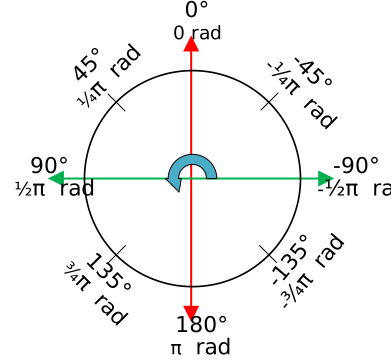
The figure above shows the unit circle with common angles labeled in degrees (°) and radians (rad). Notice that rotation to the right is negative, and the range for the whole unit circle is -180° to 180° (-Pi radians to Pi radians).
Note
The range is (-180, 180], meaning it is exclusive of -180° and inclusive of 180°.
There are some places you may choose to use a different range, such as 0° to 360° or 0 to 1 rotation, but be aware that many core WPILib classes and FRC tools are built with the unit circle above.
Warning
Some gyroscope and IMU models use CW positive rotation, such as the NavX IMU. Care must be taken to handle rotation properly, sensor values may need to be inverted. Read the documentation and verify that rotation is CCW positive.
Warning
Many sensors that read rotation around an axis, such as encoders and IMU’s, read continuously. This means they read more than one rotation, so when rotating past 180° they read 181°, not -179°. Some sensors have configuration settings where you can choose their wrapping behavior and range, while others need to be handled in your code. Careful attention should be paid to make sure sensor readings are consistent and your control loop handles wrapping in the same way as your sensor.
Joystick convention
Joysticks, including the sticks on controllers, don’t use the same NWU coordinate system. They use the NED (North-East-Down) convention, where the positive X axis points ahead, the positive Y axis points right, and the positive Z axis points down. When viewed with each positive axis pointing toward you, counter-clockwise (CCW) is a positive value and clockwise (CW) is a negative value.
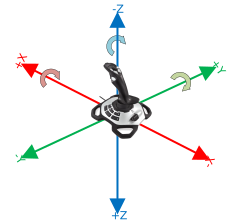
It’s important to note that joystick input values are rotations around an axis, not translations. In practical terms, this means:
pushing forward on the joystick (toward the positive X axis) is a CW rotation around the Y axis, so you get a negative Y value.
pushing to the right (toward the positive Y axis) is a CCW rotation around the X axis, so you get a positive X value.
twisting the joystick CW (toward the positive Y axis) is a CCW rotation around the Z axis, so you get a positive Z value.
For a few practical examples on coordinate visit this page.
WPIlib provides many useful geometry classes to help with coordinate transforms and other geometry. You can find more information on the WPIlib Docs.
Resources
[PhotonVision Documentation](https://docs.photonvision.org/)
[OpenCV Documentation](https://docs.opencv.org/)
[Limelight Documentation](https://docs.limelightvision.io/)